Building Celestial: A GTK Theme Journey
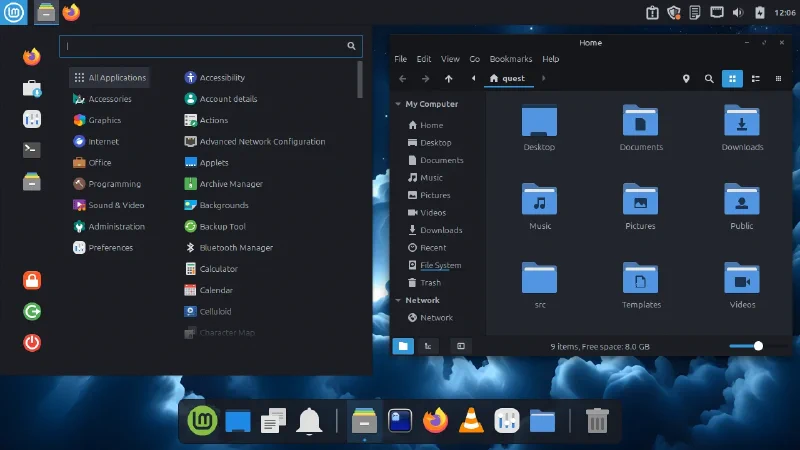
I spend a lot of time on the computer, using a lot of software. This makes me acutely aware when things don’t quite work right. A button that renders incorrectly. Inconsistent padding. Unthemed dialogs. Even the best themes out there had small bugs that annoyed me. I care deeply about a smooth, consistent desktop experience.
I’ve been theming my OS for decades. The idea of building a custom theme had crossed my mind multiple times, but I never committed to it. Now seemed like the right time. I wanted to understand GTK theming, tie it into Plank Reloaded to showcase its theming options, and deliver something truly cohesive and polished. That’s how Celestial GTK Theme was born.
The Theme Landscape⌗
I run Cinnamon as my desktop environment. Before diving into creating my own theme, I spent considerable time exploring what was already available. Cinnamon comes with solid defaults: Mint-X and Mint-Y are well-crafted themes that serve most users perfectly well. Beyond the defaults, Cinnamon Spices offers a large collection of community themes.
For those willing to venture further, the AUR and GitHub host numerous high-quality themes. In particular, vinceliuice has created many excellent themes that demonstrate both technical skill and aesthetic sensibility. His work, including themes like Matcha, WhiteSur, and others, represents some of the best theming available for Linux desktops.
With so many quality options available, why create another theme? I wanted something specific for my workflow with the freedom to maintain and evolve it exactly as needed. More importantly, I wanted to truly understand the internals of GTK theming.
Starting Point⌗
Rather than starting from scratch, I forked Matcha. Matcha has been around for years and was already a very complete theme. Even though I had to fix some Cinnamon-specific issues, it gave me an excellent foundation to learn from. I could dive into real, production-quality code rather than theoretical documentation.
The issues became my curriculum. Dialog buttons weren’t rendering correctly. System tray icons had inconsistent padding. The workspace switcher had a chunky border that looked out of place. Each fix taught me something new. Where styles lived. How SCSS compiled to CSS. Which selectors targeted which widgets. My fork became more complete with each fix, addressing edge cases while staying true to Matcha’s original design.
But to make the style changes I actually wanted, I needed a new theme. My Matcha fork would remain faithful to the original, giving existing users a more polished experience. Celestial would be where I could build my own vision while respecting what made Matcha work.
Building Celestial⌗
I wanted to stay close to Matcha’s aesthetic foundation. The color variants worked. The overall design language was solid. But there were specific design decisions I wanted to change.
The red circular X on every window close button stood out. This design choice goes back to the famous Arc GTK theme, but it drew too much attention, breaking the visual harmony of the window controls. I redesigned it to match the style of the minimize and maximize icons. Subtle. Consistent. Present but not distracting.
As I worked through the theme, I found inconsistencies in the SVG assets. Files that differed between theme variants when they should have been identical. Colors that weren’t properly synchronized across the different variants. Missing assets for the latest Cinnamon features. I also dug through old Matcha GitHub issues, testing and fixing bugs I could reproduce. Individually minor, but collectively these issues created visual noise. I went through every asset, standardizing and refining.
The Cinnamon theme needed more than fixes. The desktop environment had evolved, adding new features and styles that weren’t covered. I rebuilt the Cinnamon theme from scratch, using Mint-Y as a base to ensure it covered the absolute latest Cinnamon styles. This gave Celestial proper support for modern Cinnamon features rather than patching an outdated foundation.
The biggest addition was comprehensive Plank Reloaded support. I built a template-based system that generates matching dock themes for all variants automatically. The script extracts colors from each theme variant and applies them to Plank’s indicator colors, badge colors, and active item highlighting. Light and dark modes get appropriate background colors and strokes.
This was the integration I’d wanted from the start: a cohesive desktop where the GTK theme and dock theme worked together seamlessly, with the dock reflecting the same color scheme and design language as the rest of the desktop.
Improving the Tooling⌗
The scripts needed attention too. I went through the installation script, the SCSS parsing script, and the asset rendering scripts that convert SVGs to PNGs. I cleaned them all up so I understood exactly what each line did. No black boxes in my own theme.
Documentation got a complete overhaul. The original docs were functional but minimal. I rewrote everything to be comprehensive and clear. Detailed installation instructions with troubleshooting. A full development guide covering project structure, SCSS workflow, and contribution guidelines. Component-level README files explaining asset generation. If someone wanted to use, modify, or contribute to Celestial, they’d have proper documentation.
Testing⌗
Building a theme is one thing. Making sure it actually works across different distributions and desktop environments is another.
I tested Celestial extensively on multiple systems:
- Arch Linux with Cinnamon - My daily driver, where the theme got constant real-world use
- Linux Mint - The native home of Cinnamon, ensuring compatibility with the reference implementation
- Xubuntu - Extensive Xfce testing to validate window manager themes and desktop integration
- Ubuntu MATE - Thorough MATE desktop testing to ensure proper GTK compatibility
GNOME support was already solid in Matcha, but I wanted to make sure Xfce, MATE, and Cinnamon were all working perfectly. Each distribution revealed different quirks and configurations. Testing across this range ensured Celestial wasn’t just working on my machine, but would work for users on different setups.
Tips for a Complete Desktop⌗
Celestial handles GTK theming, but a few additional tools will make your entire desktop cohesive.
Papirus Icon Theme - My recommended icon theme. Comprehensive coverage and clean design that complements Celestial perfectly.
Hardcode-Tray - Fixes hardcoded tray icons. Many applications ship with mismatched tray icons that ignore your theme. This tool patches them to match your icon theme.
Qt Theming⌗
- qt6gtk2 - Qt6 style plugin that uses GTK2 theme rendering
- Qt Style Plugins - Qt5 style plugins including GTK2 support
These ensure Qt applications (KDE apps, VLC, Telegram, etc.) seamlessly match your GTK theme for a unified desktop experience.
Conclusion⌗
Looking at the diff between Celestial and Matcha: 557 files changed across every component. Nothing was left untouched. It wasn’t about change for its own sake. It was about understanding every decision, refining every detail, and building something that felt completely intentional.
Celestial GTK Theme is available now with twelve variants across four color schemes (Sea, Aliz, Azul, and Pueril). The theme I wanted for my desktop is out there. If you’re looking for a polished, well-documented GTK theme with proper Cinnamon and Plank Reloaded support, give it a try.